Obsidian Alternatives for Mac (8 Compared)
8 Obsidian alternatives for Mac, grouped by need: plain file editors, notes apps, an outliner, writing apps and open source. Prices and trade-offs, compared.
Obsidian is a good app. It's free for personal use, it keeps your notes as plain Markdown files in a folder, and it runs on Mac, Windows, Linux, iPhone and Android. People still look for an alternative, and usually for one of a few reasons: they don't want a vault and plugins just to edit a few files, they want a notes app that lives on Apple devices, they think in outlines, or they are writing long pieces rather than building a knowledge base.
This post lists eight alternatives for the Mac, grouped by what you need. Disclosure: we make OpenMark, one of the eight. Every fact about the other apps comes from the vendor's own website, help pages or official repository, checked on 2026-10-28. Where a vendor doesn't say something, the table says "Not stated" rather than guessing.
Last reviewed: 2026-10-28.
The baseline: what Obsidian gives you
To compare fairly, here is what you'd be leaving, from obsidian.md as of 2026-10-28:
- Price: "Free without limits" for personal use, with no sign-up. Sync costs $4 per user per month billed annually ($5 monthly). Publish costs $8 per site per month billed annually ($10 monthly). A commercial licence is $50 per user per year, and Obsidian says you are not required to buy one.
- Storage: notes are "Markdown-formatted plain text files in a vault", a folder on your disk. Obsidian's help says other editors can work on the same files.
- Platforms: Mac, Windows, Linux, iOS and Android.
- Features: Mermaid diagrams and LaTeX math (MathJax) built in, backlinks, Graph view, Canvas, and thousands of community plugins and themes.
So the question is rarely "what else is free and file-based?". It's what you'd rather have instead. For a full side-by-side of Obsidian and OpenMark, see OpenMark vs Obsidian.
The 8 alternatives at a glance
| App | Group | Best for | Price (as of 2026-10-28) | Platforms | How it stores notes |
|---|---|---|---|---|---|
| OpenMark | Just edit files | Opening and editing .md files, with Mermaid and math | $9.99 once, covers Mac, iPhone and iPad | Mac; iPhone and iPad (reader) | Your Markdown files, on your disk |
| MarkEdit | Just edit files | A free, TextEdit-style Markdown editor | Free, open source (MIT) | Mac | Edits Markdown files directly |
| Bear | Notes app | Tagged notes on Apple devices | Free; Pro $2.99/month or $29.99/year | Mac, iPhone, iPad | SQLite database |
| Apple Notes | Notes app | Quick notes already synced through iCloud | Free on the App Store (iPhone, iPad); Mac: Not stated | Mac, iPhone, iPad, iCloud.com | Not stated |
| Logseq | Outliner | Block-based outlining and linked notes | Not stated | Mac, Windows, Linux, Android; iOS in beta | DB version: database (exports as SQLite); file version: separate app |
| iA Writer | Writing | Focused drafting in plain text | Mac $49.99 once; iPhone and iPad $49.99 once | Mac, Windows, iPhone, iPad | "Write in plain text with Markdown"; storage provider agnostic |
| Ulysses | Writing | Long projects you export or publish | $5.99/month or $39.99/year | Mac, iPad, iPhone | Ulysses library; optional external folders (Markdown by default) |
| Zettlr | Open source | Academic writing with citations | Free, open source (GPL-3.0) | Mac, Windows, Linux | "All files stay on your computer" |
Prices are in US dollars before tax and can vary by country. "Not stated" means the vendor's pages that we checked don't say, not that the answer is no.
If you just want to edit files
Some people open Obsidian only to read and edit a handful of .md files: a README, a CLAUDE.md, project notes. A vault, plugins and a graph are more than that job needs. These two apps open a Markdown file and get out of the way.
1. OpenMark
Best for: opening, reading and editing individual .md files, especially ones with Mermaid diagrams or LaTeX math.
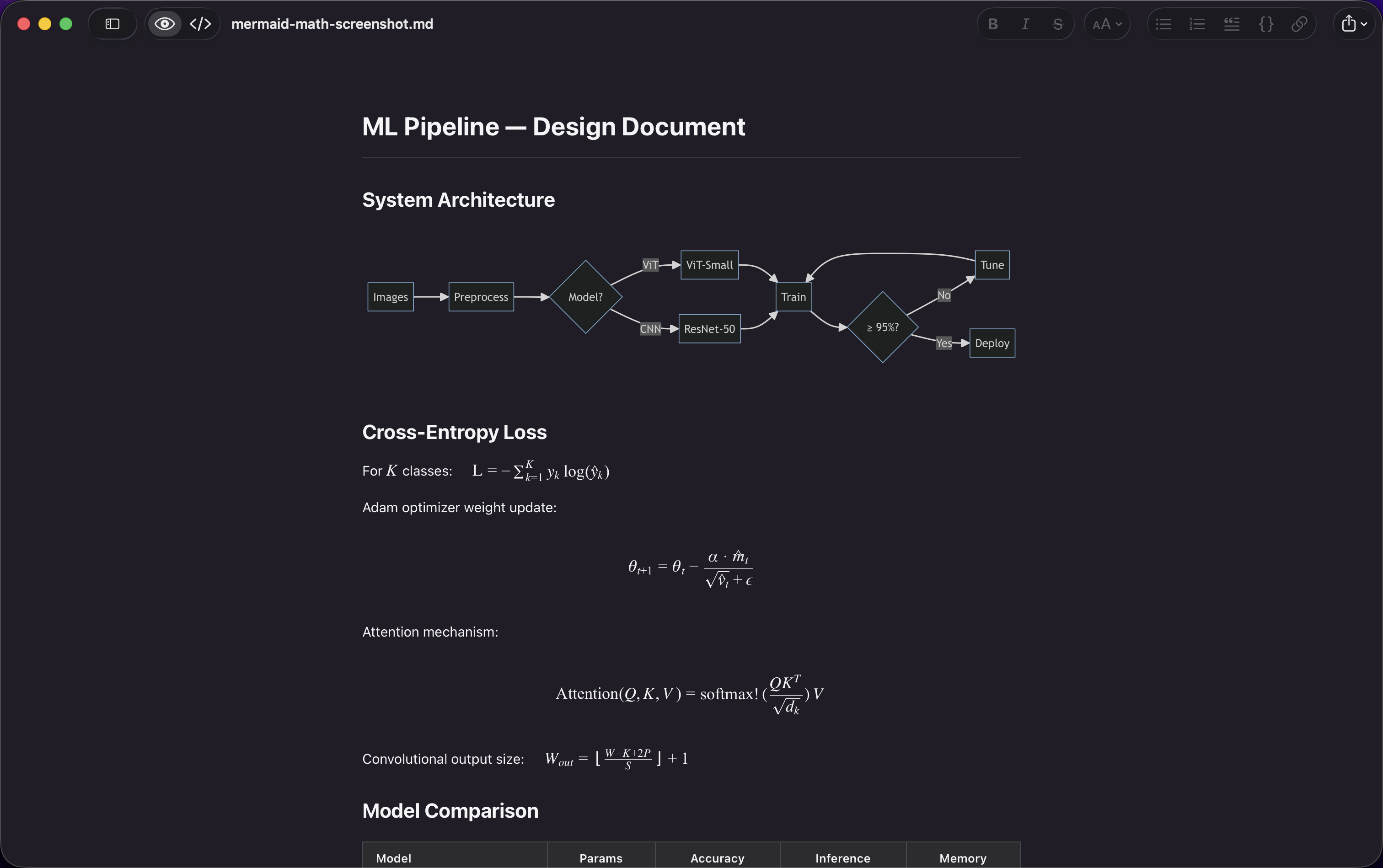
OpenMark is the app we make, so weigh this section with that in mind. It is a file editor, not a notes system: you open a .md or .mdx file and it opens rendered. There's no vault, no database, no account and no sync service. Your files stay plain Markdown on your disk, so it can open files inside an Obsidian vault too.
- Price: $9.99 once. It's a Universal Purchase, so one purchase covers the Mac, iPhone and iPad apps. Get it on the App Store.
- Platforms: the Mac app requires macOS 26 (Tahoe). On iPhone and iPad it is a reader that opens files from iCloud Drive, Google Drive, Dropbox and the Files app.
- What it does: a rendered Document view and a source Markdown view (toggle with ⌘⇧M), Mermaid diagrams (flowchart, sequence, class, Gantt, Kanban, pie, mindmap), LaTeX math via KaTeX, code highlighting in 30+ languages, GitHub-style alerts, interactive checkboxes, an outline sidebar, wiki-style
[[links]]between documents in the same folder, table formatting (⌘⇧T), Focus, Typewriter and Zen modes, four themes, and export to PDF and HTML. A Quick Look extension shows the same rendering when you press Space in Finder. - Storage: your files, where you keep them. Nothing is sent anywhere; it works offline.
Trade-offs: there's no graph view, no backlinks panel, no plugins and no sync of its own. Wiki links only work between files in the same folder. On iPhone and iPad it's for reading, not a full editor. If your Obsidian setup depends on plugins or links across a large vault, OpenMark won't replace it; it's for the "just open the file" job.
2. MarkEdit
Best for: a free, lightweight Markdown editor that feels like TextEdit.
MarkEdit describes itself on its GitHub page as "a free and open-source Markdown editor, for macOS. It's just like TextEdit on Mac but dedicated to Markdown." It's MIT-licensed, and the installer is about 4 MB.
- Price: free, open source (MIT). Download the DMG from GitHub releases or install with Homebrew (
brew install --cask markedit). - Platforms: Mac. The README lists macOS 26.0+ for current builds, with separate builds for macOS 12 to 15.
- What it does: follows the GitHub Flavored Markdown spec, built on CodeMirror 6, with native macOS controls, Shortcuts and AppleScript support. Preview, Mermaid and math come from the official MarkEdit-preview extension.
- Updates: the latest release is v1.37.0, published 2026-10-18.
Trade-offs: it's an editor first. Rendered preview, diagrams and math need the official extension. There's no iPhone or iPad app listed. More detail in OpenMark vs MarkEdit.
If you want a notes app
If what you like about Obsidian is capturing and finding notes, not managing files, an app that handles storage and sync for you can be calmer.
3. Bear
Best for: tagged Markdown notes across Mac, iPhone and iPad.
Bear calls itself "Markdown notes you'll love on Mac, iPhone & iPad". It organises notes with nested tags and supports Mermaid diagrams and LaTeX math.
- Price (as of 2026-10-28): free tier with local notes, document scanning and three themes. Pro is $2.99 per month or $29.99 per year after a 7-day free trial, and adds iCloud sync, 28+ themes, search inside PDFs and images, and note encryption.
- Platforms: Mac, iPhone, iPad.
- Storage: Bear's own FAQ says "On both iOS and macOS, Bear's notes are stored in a SQLite database."
- Export: Markdown, TextBundle, TXT, RTF, PDF, HTML, DOCX, JPG and ePub are listed; some exports require Pro.
Trade-offs: this is the main difference from Obsidian. Your notes live in Bear's database, not as files in a folder, so you get them out by exporting. Sync between devices needs Pro. There's no Windows or Android app. See OpenMark vs Bear.
4. Apple Notes
Best for: quick notes that are already on every Apple device you own.
- Price: Notes is listed as free on the App Store for iPhone and iPad (seller: Apple). Apple's pages we checked don't state a Mac price.
- Platforms: Apple's iCloud guide says you can use Notes "on your iPhone, iPad, and Mac, and on iCloud.com".
- Markdown: Apple's current Notes for Mac guide describes importing Markdown files (File > Import Markdown), exporting notes as PDF or Markdown files, and Edit > Copy as Markdown. It also says Markdown pasted into Notes "appears as formatted headings, lists, and more". The guide doesn't say which macOS version added these, so check your own Notes menu.
- Organising: folders and tags.
Trade-offs: Notes is not a Markdown editor. You write formatted notes and convert to and from Markdown at the edges. Apple doesn't say how notes are stored, and there's no plugin system. If you want your notes as .md files you can open anywhere, Notes isn't built for that.
If you think in outlines
5. Logseq
Best for: block-based outlining, daily journals and linked notes.
Logseq describes itself on GitHub as "a privacy-first, open-source platform for knowledge management and collaboration", licensed AGPL-3.0. It is in the middle of a big change, so it's really two products right now:
-
The DB version is the current line in the main repository. Release 2.0.2 (published 2026-10-07) is labelled "Beta Testing", with downloads for Mac (Apple Silicon and Intel), Windows, Linux and Android. The release notes say the iOS app is in a TestFlight beta and under App Store review. Graphs are stored in a database and can be exported as a SQLite file. The README says the DB version is in beta and that "data loss is possible", and recommends backups.
-
The file version has been split off into a separate repository, Logseq OG, whose latest release is 1.0.0 (2026-04-15). The Logseq OG README says it supports Markdown and Org-mode files.
-
Price: Logseq's website doesn't state one in the pages we checked. It is open source (AGPL-3.0).
-
Outliner: Logseq's docs describe its List View as displaying "nodes in an outliner", with blocks and pages unified as nodes referenced with
[[]].
Trade-offs: if you want the outliner style, Logseq is the main open source option, but you have to choose between a beta database version and the separate file version. Anyone moving from Obsidian for file-based storage should look at the file version and read the DB notes first.
If you mostly write
If you use Obsidian mainly to draft articles, chapters or posts, a writing app puts the writing first and the knowledge base second.
6. iA Writer
Best for: focused drafting in plain text.
- Price (as of 2026-10-28): Mac $49.99 one-time, Windows $29.99 one-time, iPhone and iPad $49.99 one-time through the App Store. Each platform is a separate purchase, and iA says subscriptions aren't available. There's a 7-day free trial for Mac and Windows with no credit card, and a 20% educational discount when you buy direct.
- Platforms: Mac (macOS 10.15 or later), Windows, iPhone and iPad.
- Storage: "Write in plain text with Markdown." iA's support pages say Writer is "file storage provider agnostic" and recommend iCloud.
- What it does: Focus Mode "highlights the sentence or paragraph you're working on and fades everything else", a Library with folders, favorites and hashtags, Wikilinks, and Content Blocks for images, CSV tables, text files and code.
Trade-offs: you pay per platform, and iA says major updates may cost extra. iA doesn't document Mermaid or math support on its product or support pages. It's a writing tool, so there's no graph view or plugin ecosystem. See OpenMark vs iA Writer.
7. Ulysses
Best for: long writing projects that end up as PDFs, Word files, ebooks or blog posts.
- Price (as of 2026-10-28): $5.99 per month or $39.99 per year in the US. One subscription covers all your Macs, iPads and iPhones, includes iCloud sync, and can be shared with Family Sharing. Ulysses says there's a free trial on all devices and reduced pricing for students.
- Platforms: Mac, iPad, iPhone.
- Storage: texts are "stored in Ulysses' library". You can also add external folders on your drive or a cloud service; for those, "By default, Markdown is selected".
- What it does: a "markup-based text editor", export to PDF, Word and ebook, and publishing to WordPress, Ghost, Medium and Micro.blog.
Trade-offs: it's a subscription. Your main library lives inside Ulysses, and Ulysses' help says it "doesn't create automatic backups of external folders", so back those up yourself. Ulysses' homepage doesn't mention Mermaid or math. See OpenMark vs Ulysses.
If you want open source
8. Zettlr
Best for: academic writing with citations, on any desktop OS.
Zettlr calls itself "Free and Open Source Software (FOSS)", supported by donations.
- Price: free, open source (GPL-3.0).
- Platforms: Mac, Windows, Linux. The site says it is powered by Electron.
- Storage: "There is no forced cloud-synchronization or telemetry, and all files stay on your computer."
- What it does: renders LaTeX math and Mermaid charts as you write, citations from Zotero, JabRef and Juris-M with over 9,000 styles, Zettelkasten features, full text search, and Pandoc-based export with templates.
- Updates: the latest release is v4.9.0, published 2026-10-25.
Trade-offs: there's no iPhone or iPad app listed. It's aimed at research and publication writing, so if you just want to read a file, it's more than you need.
How to choose
Start from what bothers you about Obsidian, not from a feature list:
- "I only want to open and edit a few
.mdfiles." Use a file editor. OpenMark if you want rendered Mermaid and math out of the box and an iPhone/iPad reader; MarkEdit if you want free and open source on the Mac. Both work on files in an existing vault, so you can keep Obsidian for the rest. - "I want notes that just sync between my Apple devices." Bear (Markdown, tags, Pro for sync) or Apple Notes (formatted notes, with Markdown import and export). Both store notes in their own app rather than as loose files.
- "I think in bullet points." Logseq, after deciding between the DB beta and the file version.
- "I mostly write long pieces." iA Writer for a one-time purchase and a quiet editor; Ulysses for a subscription with export and publishing built in.
- "It has to be open source." Zettlr (GPL-3.0), MarkEdit (MIT) or Logseq (AGPL-3.0), each with its source on GitHub.
- "I'd rather pay once than subscribe." OpenMark ($9.99 once for Mac, iPhone and iPad) or iA Writer ($49.99 once per platform). Bear Pro and Ulysses are subscriptions.
If you're not leaving Obsidian at all, a viewer or editor alongside it can still help, since your vault is plain files. For a wider list that isn't limited to Obsidian replacements, see the best Markdown editors for Mac. To read a single file without installing anything, try the online Markdown viewer.
Frequently asked questions
- What is a good Obsidian alternative for Mac?
- It depends on what you want to drop. To just open and edit .md files, OpenMark ($9.99 once; a Mac editor with an iPhone and iPad reader) or MarkEdit (free, MIT, Mac) fit. For a notes app across Apple devices, Bear or Apple Notes. For an outliner, Logseq. For long-form writing, iA Writer or Ulysses. For open source academic writing, Zettlr.
- Is there a free Obsidian alternative?
- Yes. MarkEdit is free and open source (MIT). Zettlr is free and open source (GPL-3.0). Bear has a free tier without iCloud sync. Apple Notes is free on the App Store for iPhone and iPad. Logseq is open source (AGPL-3.0). Obsidian itself is also free for personal use, as of 2026-10-28.
- Which Obsidian alternatives keep my notes as files?
- Obsidian keeps notes as plain text Markdown files in a folder. OpenMark and MarkEdit edit Markdown files directly. Ulysses can use external folders, with Markdown as the default format. Zettlr says all files stay on your computer. Bear stores notes in a SQLite database, and Ulysses keeps its own texts in its library.
- Can I use Obsidian and another app on the same notes?
- Yes, as long as the other app opens plain Markdown files. Obsidian's help says its notes are Markdown plain text files and that you can use other text editors and file managers on them. A file editor such as OpenMark or MarkEdit can open the same .md files from your vault.